
What Is a Set in Python?
Learn the fundamentals of Python sets, including how to handle unique values, perform fast membership testing, and execute mathematical set operations.
In our previous article, we talked about dictionaries in Python. If you haven't read it yet, you can read it by clicking here.
Now that we have covered lists, tuples, and dictionaries, it is time to look at the final built-in collection type in Python: the set. While it might look a bit like a dictionary because it uses curly braces, it serves a very different mathematical purpose.
What is a Set?
A set is a collection of items that is unordered, unindexed, and most importantly, does not allow duplicate values. You can think of it exactly like a mathematical set.
You can create a set by placing your items inside curly braces {}, separated by commas, or by using the built-in set() function.
# Creating a set
my_set = {"apple", "banana", "cherry"}

# Sets automatically remove duplicates
numbers = {1, 2, 2, 3, 4, 4, 4, 5}
print(numbers)  # Output: {1, 2, 3, 4, 5}
Why Use Sets?
If sets are unordered and unindexed (meaning you cannot access items using my_set[0]), why are they useful?
- Removing Duplicates: The fastest way to remove duplicate values from a list is to convert it into a set, and then back into a list.
- Fast Membership Testing: Checking if an item exists in a set (using the
inkeyword) is significantly faster than checking if it exists in a list, especially for large datasets. This is because sets use a hash table under the hood. - Mathematical Operations: Sets excel at comparing groups of data using standard mathematical operations like union, intersection, and difference.
Modifying a Set
Because sets are unordered, you cannot change a specific item. However, you can add or remove items.
fruits = {"apple", "banana"}

# Adding a single item
fruits.add("orange")

# Removing an item
fruits.remove("banana")

# Using discard() is safer because it won't throw an error if the item doesn't exist
fruits.discard("grape")
Mathematical Set Operations
This is where sets truly shine. If you have two different datasets and you need to find commonalities or differences, sets provide built-in methods that do this instantly.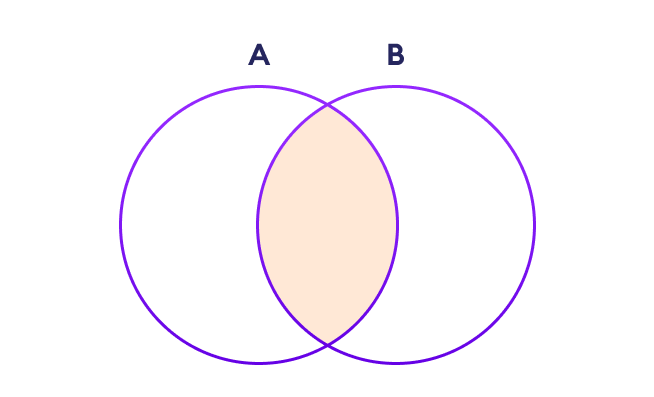
set_a = {1, 2, 3, 4}
set_b = {3, 4, 5, 6}

# Union: Combines all unique elements from both sets
print(set_a.union(set_b))
# Output: {1, 2, 3, 4, 5, 6}

# Intersection: Keeps only the elements that exist in BOTH sets
print(set_a.intersection(set_b))
# Output: {3, 4}

# Difference: Keeps elements in set_a that are NOT in set_b
print(set_a.difference(set_b))
# Output: {1, 2}
Operators as Shorthand for Set Methods
Every set method you just saw also has an equivalent operator, and in practice you'll see the operator form used just as often as the method form:
set_a = {1, 2, 3, 4}
set_b = {3, 4, 5, 6}

print(set_a | set_b)   # union:        {1, 2, 3, 4, 5, 6}
print(set_a & set_b)   # intersection: {3, 4}
print(set_a - set_b)   # difference:   {1, 2}
print(set_a ^ set_b)   # symmetric difference: {1, 2, 5, 6}
That last one, ^ (symmetric difference), is the one the method-only version above skipped: it returns everything that's in either set but not in both — the mirror opposite of intersection. It's useful for questions like "which items appeared in only one of these two datasets."
The method form (.union(), .intersection()) has one advantage the operator form doesn't: it accepts any iterable, not just another set. set_a.union([3, 4, 5]) works directly on a list; set_a | [3, 4, 5] raises a TypeError, because | requires both operands to already be sets.
Set Comprehensions
Like lists and dictionaries, sets support comprehension syntax — the same idea, with curly braces instead of square brackets:
words = ["apple", "banana", "apple", "cherry", "banana"]
unique_lengths = {len(word) for word in words}
print(unique_lengths)  # {5, 6}
This is a genuinely common pattern: extracting some derived property from a collection while automatically discarding duplicates, in a single expression.
frozenset: An Immutable Set
Regular sets are mutable, which means — like lists and dictionaries — they can't be used as dictionary keys or stored inside another set (both require hashable elements). frozenset is an immutable version of set that solves exactly this:
regular_set = {1, 2, 3}
frozen = frozenset([1, 2, 3])

frozen.add(4)  # Error: 'frozenset' object has no attribute 'add'

# But a frozenset CAN be used as a dictionary key or inside another set
cache = {frozenset([1, 2]): "result_a", frozenset([3, 4]): "result_b"}
Reach for frozenset specifically when you need a set-like collection that itself needs to be hashable — most commonly as a dictionary key representing a combination of things (like a memoization cache keyed by a set of input IDs, where order shouldn't matter).
A Worked Example: Comparing Two Datasets
Here's a realistic scenario that shows why sets matter beyond deduplication. Imagine you're comparing tags across two blog posts to find overlapping and unique topics:
post_a_tags = {"python", "django", "backend", "orm"}
post_b_tags = {"python", "javascript", "frontend", "backend"}

shared_topics = post_a_tags & post_b_tags
print(shared_topics)  # {'python', 'backend'}

only_in_a = post_a_tags - post_b_tags
print(only_in_a)  # {'django', 'orm'}

all_topics_covered = post_a_tags | post_b_tags
print(all_topics_covered)  # {'python', 'django', 'backend', 'orm', 'javascript', 'frontend'}
Doing this with lists would mean writing nested loops or list comprehensions with manual in checks for every comparison. With sets, each comparison is a single operator, and Python handles the underlying hash-table lookups for you.
Sets vs. Lists: When Should You Reach for a Set?
- Use a list when order matters, duplicates are meaningful (a shopping cart can have two of the same item), or you need to access elements by position.
- Use a set when you only care about whether something is present, not how many times or in what order, and especially when you'll be checking membership repeatedly. Because sets are backed by a hash table, checking
item in my_setstays fast on average even as the set grows, whileitem in my_listgets slower as the list grows because Python has to check entries one at a time.
A common real-world pattern: if you find yourself writing if item not in my_list: my_list.append(item) to keep a collection duplicate-free, that's usually a sign the collection should have been a set from the start.
Common Pitfalls with Sets
- Trying to create an empty set with
{}. This is one of Python's sharper edges —{}creates an empty dictionary, not an empty set, because dictionaries claimed the curly-brace literal first. To create an empty set, you must useset()explicitly. - Assuming sets preserve insertion order. Unlike dictionaries (which have guaranteed insertion order since Python 3.7), sets make no ordering guarantee at all. Printing the same set twice within the same program run typically shows a consistent order, but you should never write code that depends on it — if order matters, sort the result or use a list instead.
- Putting unhashable items in a set. Just like dictionary keys, set elements must be hashable — you can put strings, numbers, and tuples in a set, but not lists or dictionaries, since those are mutable and Python can't guarantee a stable hash for them.
- Using
.remove()when you're not sure the item exists..remove()raises aKeyErrorif the item isn't in the set..discard()does the same job silently, doing nothing if the item is absent — prefer it whenever the item's presence isn't guaranteed.
Conclusion
Sets might not be the data structure you reach for every single day, but when you face problems involving uniqueness, comparisons, or rapid membership testing, they are undeniably the right tool for the job. By understanding lists, tuples, dictionaries, and sets — along with the shorthand operators, comprehensions, and the immutable frozenset variant — you now have a complete toolkit to handle almost any data collection scenario in Python.